API tokens
The connection key a coding tool presents to Madebook — how to create one, what it can reach, the scopes, expiry, and what revoking one does.
An API token is the credential a coding client presents to Madebook's MCP server. It is what makes a work session show up under a person's name.
One key per engineer is the point. Revoking one person's key never disturbs anyone else's.
Who can create one
org.manage_tokens is held by owner, admin and member. An engineer who cannot create a token cannot use the product, so members can mint their own.
What you can do to an existing token depends on whose it is: you can always revoke or delete a token you created. Acting on someone else's needs organization admin.
Creating one
Organization → MCP tokens → Create MCP token. This opens the token setup directly at /organizations/<id>/tokens. Inside a workspace, use Setup → MCP tokens; this opens the token page for that workspace’s organization. Setup → Connections opens its shared connections. You can also use Connections → MCP tokens & editor or the Create MCP token button at the top of Connections.
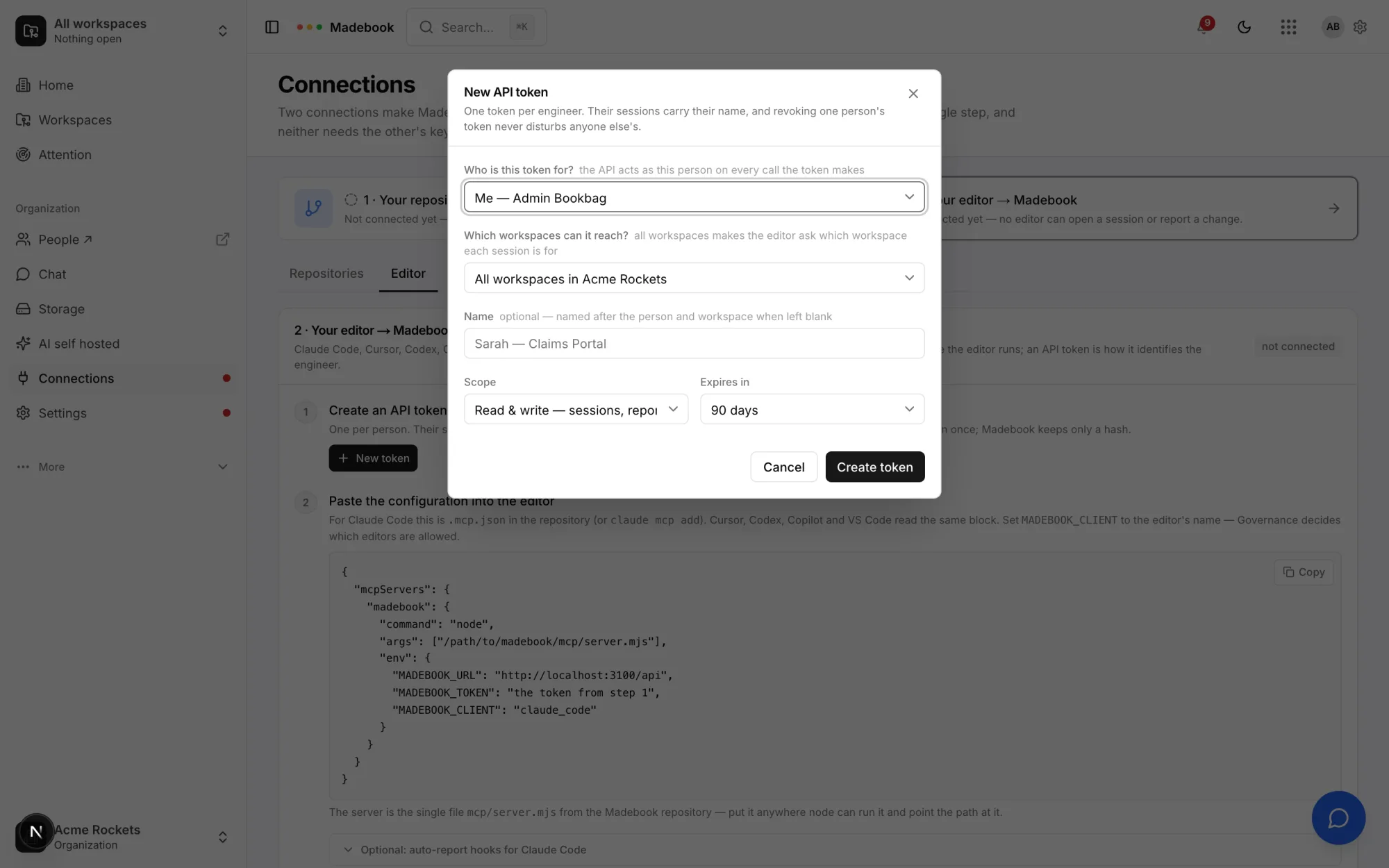
One token per engineer. Their sessions carry their name, and revoking one person's token never disturbs anyone else's.
| Field | What it means |
|---|---|
| Who is this token for? | The API acts as this person on every call the token makes. A card per person, with search and a chip per organization role. The first card is Me — <your name>; when you are alone it says No other registered members yet. You are not repeated further down the list, and a member who has never opened Madebook is not listed either — a token cannot act as somebody who has no account here yet. |
| Which workspaces can it reach? | A card for All workspaces in <name> (The editor asks which workspace each session is for), then one card per workspace, <workspace> only, with search and a chip per workspace kind. |
| Name | Optional. Left blank, it is named after the person and the workspace — for example Sarah — Claims Portal. Placeholder: Sarah — Claims Portal. |
| Scope | Read & write — sessions, reports, evidence, or Read-only — context and briefings. |
| Expires in | 30 days, 90 days, 1 year, or Never. Default 90 days. |
Choosing an assignee who is not a registered member of the organization fails with "The assignee must be a registered member of this organization."
The token value
The token looks like this:
vos_XXXXXXXXXXXXXXXXXXXXXXXXXXXXXXXX
A vos_ prefix and 32 base62 characters. Madebook stores a SHA-256 hash of it and keeps the first 12 characters — vos_ plus eight — so the row can be identified in a list.
The full value is shown exactly once, in a warning panel on the page you created it from:
Copy this token now — it will not be shown again
with a Copy button and an I have saved it button. On Connections the new token is also filled straight into the MCP configuration block below it, so the next step is one copy. If the clipboard is unavailable the page says "Could not copy — select it and copy by hand".
Nobody, including a platform administrator, can read a token back afterwards. A lost token is replaced, not recovered.
What a token reaches
Four ceilings apply, in this order, before the usual role check runs at all.
- The token's organization must match the organization of what is being asked for. Otherwise: "This token is not valid for that organization."
- A workspace-scoped token must match the workspace. Otherwise: "This token is scoped to a different workspace."
- A read-only token fails any write. "This token is read-only."
- Then the assignee's own role and workspace membership are checked as normal. A token can never reach further than the person it was issued to.
A read-only token can brief an agent but can never open a session or report a change.
A token scoped to one workspace opens sessions there without naming it. A token for all workspaces makes the assistant list your workspaces and ask which one the work is for before a session opens.
Scope, read at a glance
| Scope value | What it allows |
|---|---|
read |
Context and briefings. No session, no report, no evidence. |
read_write |
Sessions, reports, evidence. This is the default. |
What a row shows
Each token in the list carries badges and a subtitle built from what actually happened:
read-onlyorread & write- the assignee's name
- the workspace name, or all workspaces
revokedwhen it has been revokedexpiredwhen it is past its expiry
and under it: Created <date>, then either · last used <time ago> or · never used, then · expires <date> when it has an expiry.
The last-used time is written at most once every 15 minutes, so it is accurate to within that window rather than to the second.
Revoking and deleting
These are two different things and the dialog says so.
Revoke stops the token working immediately and keeps the row as a record of the credential that existed.
Delete removes the row too. The audit log still remembers both, so nothing is ever silently forgotten.
The revoke dialog is headed "Revoke or delete <name>?":
Either way it stops working immediately — whoever's coding client uses it loses its MCP connection mid-sentence.
and, when the token belongs to someone else, adds "This token belongs to <name> — they will need a new one to reconnect."
You cannot delete a token that is still live. Trying gives:
Revoke the token first — deleting is for records, revoking is what cuts a client off.
Expiry
expires_days accepts a whole number from 1 to 365. The dialog offers 30, 90, 365, or none. A token past its expiry shows an expired badge and stops authenticating.
The empty state
No tokens yet. Create one, then point your coding client's MCP configuration at Madebook with it.
Related
- Connections — the page the token is created from.
- The MCP server — where the token is actually used.
- Roles and permissions — the capability that gates this page.